Adding Sketch Folders to Arduino IDE
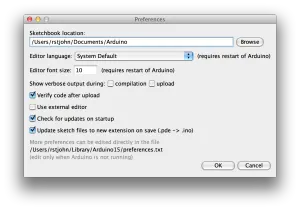
For the Seeed Studio starter kit or any Arduino IDE: 1. Click “Arduino -> Preferences” 2.
Originally published on the rexstjohn.com blog
Originally published at rexstjohn.com on October 10, 2014. Recovered from the Internet Archive.
For the Seeed Studio starter kit or any Arduino IDE:
- Click “Arduino -> Preferences”
- View the “Sketchbook Location” field
Click “Browse,” drag and drop the Sketches folder you downloaded from the Seeed Studios GitHub into the resulting folder and rename it something like “SeeedStudios.”
You may need to restart your Arduino IDE.