In-Place AJAX Search Box With Ruby simple_form Gem
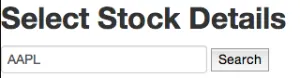
Here is how to implement a “simpleform” search box in Ruby On Rails using Ajax. The form will look like the below with an inline “Search” button.
Originally published on the rexstjohn.com blog
- ruby
Originally published at rexstjohn.com on January 8, 2014. Recovered from the Internet Archive.
Here is how to implement a “simple_form” search box in Ruby On Rails using Ajax. The form will look like the below with an inline “Search” button.
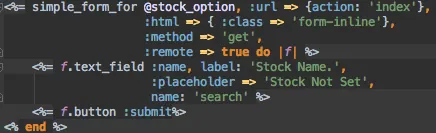
In your ERB file, “:remote => true” tells the form to use AJAX. Specifying the url action as ‘index’ prevents the form from redirecting to some other controller action like “update” or “show.” Using ‘get’ is also necessary here or we may get routing errors.
Note also: Setting the “name:” field in the text_field formats the params as {search: your_search}.
In your Controller:
class StockOptionsController < ApplicationController
  def index
    name = params[:search]
    @stock_option = StockOption.search(name)
  end
end

private

def app_params
  params.require(:stock_option).permit( :purchase_type, :purchase_date, :symbol, :name, :purchase_price, :number_of_shares, :total_cost, :price_per_option, :number_of_contracts, :total_option_cost
  )
end
In your model:
class StockOption < ActiveRecord::Base   validates_presence_of :name   def self.search(search)     puts 'search ' + search.to_s     if search       find(:first, :conditions =>  ['name LIKE ?', "%#{search}%"])
    else
      self.first
    end
  end
end