Is React Native Cross-Platform Snake-Oil?
I watched the video on React Native which hit the front page of Hacker News the other day and remain pretty skeptical about the promises being made.
Originally published on the rexstjohn.com blog

- ios
- android
Originally published at rexstjohn.com on January 29, 2015. Recovered from the Internet Archive.
Cross platform native UI, you say?
I watched the video on React Native which hit the front page of Hacker News the other day and remain pretty skeptical about the promises being made.
Having built both native iOS and Android experiences (as well as cross-platform applications in Cordova / Phone Gap and Flex 4), I am not sold that the key problems preventing developers from producing a truly unified codebase have been solved (or are likely to ever be solved).
The obsession with attempting to streamline native mobile development is well-placed…I fully understand the pain involved in trying to manage Android and iOS development simultaneously…but React Native isn’t going to alleviate the key problems which cause this pain.
Time to take off your propeller-hat and think about users
The problem with the native mobile cross-platform obsession is that it is an *engineering obsession not rooted in the best interests of users.*While Facebook may be able to address the problem from a engineering standpoint, the ultimate result is not going to be a pleasing to users (something which Facebook struggles against mightily on mobile).
You can’t engineer native design patterns out of the equation
Here is why React Native is probably going to fail to accomplish its goal: Platform specific design patterns. Android and iOS (and Windows Phone…) have fundamentally different design guidelines backed by completely different sets of native UI controls which are mostly not interchangeable unless:
- You severely restrict design patterns on one or both platforms to avoid patterns which are not natively shared across all
- Provide 3rd party support for non-native controls across all platforms to force them to be the same
- Provide the exact same experience on all platforms and avoid all native controls for any platform (e.g. something like Paper or FlipBoard)
Users selected their chosen mobile device for a reason and expect (even deserve to have) a certain set of user experience patterns. Providing a crappy average user experience across multiple platforms to make engineering easier is not an acceptable solution to the problem.
Design patterns are rigidly backed by native UX frameworks
Design guidelines are not just pretty words on paper, they are “hard coded” into Android, iOS and Windows Phone. These patterns are often rigid in nature and (as in the case of a hardware back-button on Android which is altogether missing on iOS handsets and tablets) simply impossible to duplicate across devices without a misdirected attempt at customization.
A UI control from Android may be architected, from the bottom up, to be completely non-compatible with equivalent controls from other platforms. Replicating the behavior of one control from Android may require multiple combined controls from iOS or Windows Phone and vice-versa.
Missing controls
UIPageViewController? Not in Android. UISplitViewController? Not in Android (though possible to approximate readily with List Fragments). Navigation Drawer? Not in iOS (without some hackery or inclusion of 3rd party libraries). These examples are less critical, but there are some really bad ones which will surely leave developers and designers (and most importantly, users) puzzled.
Tool Bar / Tab Bar / Action Bar Insanity

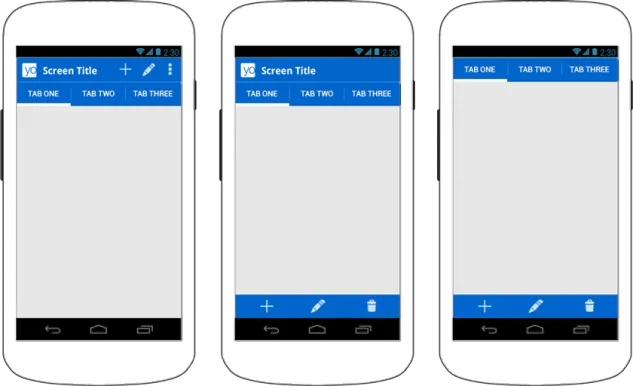
The Action Bar in Android behaves fundamentally different from it’s iOS equivalent(s). On Android, the Action Bar “splits” on mobile phones to spread options across the top and bottom of the phone screen. In “tablet mode,” the Action Bar occupies the title bar along with all it’s related menus, tabs and contextual actions (see above).
In iOS, replicating the behavior of this Action Bar construct will involve swapping and mix-matching three completely separate and functionally different components: UITabBar, UINavigationController and UIToolBar. If you add in a “Universal” iPad mode with a UISplitViewController, this becomes even more difficult (although probably less so since the iOS 8 update which allows UISplitViewController on iPhones). To make matters worse, contextual buttons, which modify content on the current screen, would need to hop back and forth between these controls in order to provide a platform consistent equivicol experience with Android.
Tab Bar goes on the bottom in iOS, on the top in Android
In iOS, the area directly under the navigation bar is reserved for UIToolBar (which contains contextual actions). In Android, the area under the title bar is where Tab Bar goes. In iOS, the area across the bottom of the screen is where UITabBar goes. In Android, contextual options from Action Bar (which would normally be placed in an iOS navigation or UIToolBar) feed across the bottom of the screen. Confused? So are most developers and designers.

Source: http://iphone-dev-kitchan.blogspot.com/2010/05/creating-application-with.html
Adapting this experience across iOS and Android (and don’t forget Windows Phone!) for phone and tablet form-factors using the same code base would require a level of convoluted UI programming which borders on Cyclopean. I fear for any developer tasked with making this “easy.”
iOS (iPhone) does not have drop-down menus, Android does

The iPhone doesn’t have drop down menus, instead relying on pickers for contextual data selection, while Android uses drop down menus for navigation. Another way iOS exposes options it to give the user a slide-up modal dialog or action sheet. Neither are meant for navigation. iOS does, however, have pop-up menus which can live in the bottom right of a UITabBarController in the form of a moreNavigationController. Finally, the iPad has a control called UIPopoverController which can provide a drop-down of sorts when combined with a list view.
Is there realistically a way to transpose, using automagical code, an Android interface which makes use of drop down menus into an equivalent iOS interface…and have it be “Universal” across iPhone and iPad (and don’t forget Windows Phone)? I am doubtful it could be done well.
The Universal Application Mega-Fail
Building Universal applications (which reuse code across phone and tablets) is already quite difficult and many companies fail to accomplish this goal even with teams of skilled native developers (and don’t forget designers). I have a truly difficult time believing that we can sprinkle some React Native on this issue and solve it across platforms. I am not going to drill much farther into this topic other than to say I will assume React Native is meant for either basic applications or ones that provide a single design across all operating systems.
Lets not even get into talking about supporting watch and TV products…
The Cross-Platform “Snake Oil Demo” Strategy
Cross-platform native platforms always seem to demo applications with this pattern:
- List of items to select
- Navigation controller
- Detail View of a selected item
The reason why React Native (and Fastbook before it, which relies on HTML5 vs native controls) use this pattern is that this is probably the only pattern which is consistent across mobile OS’s. Step outside of this pattern and you are going to run into problems.
Closing thoughts: iOS and Android move too fast to catch
iOS, Android (and don’t forget Windows Phone) SDKs are massive in size. The rate at which they change is astonishing: Last WWDC, Apple introduce 4,000(!) new APIs. Thats just iOS, not even including Android (and don’t forget Windows Phone). These companies employ tens of thousands of busy engineers doing nothing updating them.
Do we really and truly believe that Facebook, no matter how many brilliant engineers they employ, can possibly update React Native fast enough to keep up with these changes? Do we truly believe that Facebook can possibly stay ahead of these yearly updates at the grueling pace which Apple and Google have been maintaining?
Native applications built with React Native will likely always be behind the latest and greatest updates from Apple and Google, they will likely always lag…
Unless you want to provide your users with neutral experiences that exclude UI patterns which make iOS and Android distinct and “Great.” #makesoftware