Testing Node.js + Express + Genymotion Android Emulator : Rex St John
I recently had a project where I needed to test the behavior of the Genymotion Android emulator when attempting to download files.
Originally published on the rexstjohn.com blog
- android
- nodejs
Originally published at rexstjohn.com on December 4, 2013. Recovered from the Internet Archive.
I recently had a project where I needed to test the behavior of the Genymotion Android emulator when attempting to download files.
The solution was the build a local Node Express server and have the Genymotion emulator navigate to it so I could test out my routes.
Genymotion runs in VirtualBox, so to get it’s ip address you have to run “ifconfig vboxnet0″ in terminal which will yield something like this:
vboxnet0: flags=8843<UP,BROADCAST,RUNNING,SIMPLEX,MULTICAST> mtu 1500
	ether 0a:00:27:00:00:00
	inet 192.168.56.1 netmask 0xffffff00 broadcast 192.168.56.255
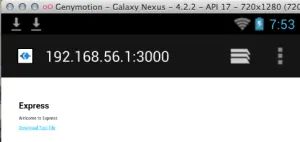
Now, in Genymotion, just navigate (in the browser) to:192.168.56.1. This will reveal your localhost based server (assuming you have a Node or other server running on localhost.
I then used the following Express setup app.js, index.jade and package.json (after the usual npm install, node app calls):
/**
* index.jade
*/
extends layout

block content
  h1= title
  p Welcome to #{title}
  a(href='/download') Download Test File

/**
* package.json
*/
{
  "name": "application-name",
  "version": "0.0.1",
  "private": true,
  "scripts": {
    "start": "node app.js"
  },
  "dependencies": {
    "express": "3.4.6",
    "jade": "*",
    "stylus": "*",
    "mime": "*"
  }
}

/**
* app.js
*/
var express = require('express');
var routes = require('./routes');
var user = require('./routes/user');
var http = require('http');
var mime = require('mime');
var fs = require('fs');
var path = require('path');

var app = express();

// all environments
app.set('port', process.env.PORT || 3000);
app.set('views', path.join(__dirname, 'views'));
app.set('view engine', 'jade');
app.use(express.favicon());
app.use(express.logger('dev'));
app.use(express.json());
app.use(express.urlencoded());
app.use(express.methodOverride());
app.use(app.router);
app.use(require('stylus').middleware(path.join(__dirname, 'public')));
app.use(express.static(path.join(__dirname, 'public')));

// development only
if ('development' == app.get('env')) {
app.use(express.errorHandler());
}

app.get('/', routes.index);
app.get('/users', user.list);

http.createServer(app).listen(app.get('port'), function(){
console.log('Express server listening on port ' + app.get('port'));
});

app.get('/download', function(req, res){

var file = __dirname + '/files/Ideas.docx';

var filename = path.basename(file);
var mimetype = mime.lookup(file);

res.setHeader('Content-disposition', 'attachment; filename=' + filename);
res.setHeader('Content-type', mimetype);

var filestream = fs.createReadStream(file);
filestream.pipe(res);
});
I could then hit the “download” endpoint in the Genymotion web browser. Happy fun times.